

.NET CLI Item Templates for Xperience by Kentico projects, usable at the command line or in Visual Studio
These templates have been tested up to Xperience by Kentico v29.3.3.
Note: the templates might work on earlier versions of Xperience, but have only been tested for the version above.

Install the XperienceCommunity.DotnetItemTemplates NuGet Template package globally:
dotnet new install XperienceCommunity.DotnetItemTemplatesOr, update the templates to the latest version if you already have them installed
dotnet new updateUse the templates in Visual Studio or at the command line:
dotnet new xpc-page-builder-widget -n HeroWidget -o .\MySite.Web\Components\WidgetsThis will generate a new folder automatically: .\MySite.Web\Components\Widgets\Hero containing the following files:
HeroWidget.csHero.cshtml
To view the list of all the templates that are installed with this package run dotnet new list at the command line.
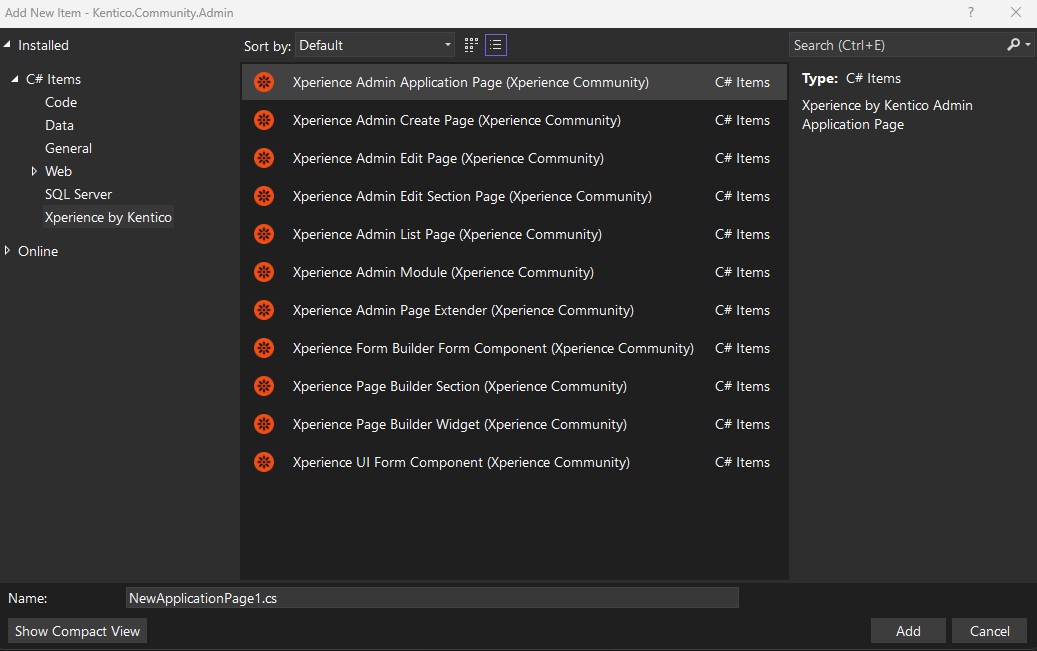

This package includes the following item templates.
Note: Each template has a required suffix for the name of the item you are scaffolding. You can use any name you want as long as you include the suffix at the end of the name.
-
-
Required suffix
AdminModuledotnet new xpc-admin-module -n AppleAdminModule -o .\App.Admin\Apples -
Generates
.\App.Admin\Apples\AppleAdminModule.cs
-
-
-
Required suffix
ApplicationPagedotnet new xpc-admin-application-page -n AppleApplicationPage -o .\App.Admin\Apples -
Generates
.\App.Admin\Apples\AppleApplicationPage.cs
-
-
-
Required suffix
EditPagedotnet new xpc-admin-edit-page -n AppleEditPage -o .\App.Admin\Apples -
Generates
.\App.Admin\Apples\AppleEditPage.cs
-
-
-
Required suffix
EditSectionPagedotnet new xpc-admin-edit-section-page -n AppleEditSectionPage -o .\App.Admin\Apples -
Generates
.\App.Admin\Apples\AppleEditSectionPage.cs
-
-
-
Required suffix
ListPagedotnet new xpc-admin-list-page -n AppleListPage -o .\App.Admin\Apples -
Generates
.\App.Admin\Apples\AppleListPage.cs
-
-
-
Required suffix
CreatePagedotnet new xpc-admin-create-page -n AppleCreatePage -o .\App.Admin\Apples -
Generates
.\App.Admin\Apples\AppleCreatePage.cs
-
-
-
Required suffix
PageExtenderdotnet new xpc-admin-page-extender -n ApplePageExtender -o .\App.Admin\Apples -
Generates
.\App.Admin\Apples\ApplePageExtender.cs
-
-
-
Required suffix
FormComponentdotnet new xpc-admin-ui-form-component -n AppleFormComponent -o .\App.Admin\Apples -
Generates
.\App.Admin\Apples\AppleFormcomponent.cs
-
-
Admin UI Form Component (TSX))
-
Required suffix
FormComponentdotnet new xpc-admin-ui-form-component -lang TypeScript -n AppleFormComponent -o .\App.Admin\Client\src\apples -
Generates
.\App.Admin\Client\src\apples\AppleFormComponent.tsx
-
-
-
Required suffix
ValidationRuledotnet new xpc-admin-validation-rule -n FreshAppleValidationRule -o .\App.Admin\Apples -
Generates
.\App.Admin\Apples\FreshAppleValidationRule.cs
-
-
-
Required suffix
ValidationRuledotnet new xpc-admin-validation-rule -lang TypeScript -n AppleValidationRule -o .\App.Admin\Client\src\apples -
Generates
.\App.Admin\Client\src\apples\AppleValidationRule.tsx
-
-
-
Required suffix
FormComponentdotnet new xpc-form-builder-form-component -n AppleFormComponent -o .\App.Web\Components\FormComponents -
Generates
.\App.Web\Components\FormComponents\Apple\AppleFormComponent.cs.\App.Web\Components\FormComponents\Apple\Apple.cshtml
-
-
-
Required suffix
FormSectiondotnet new xpc-form-builder-form-section -n AppleFormSection -o .\App.Web\Components\FormSections -
Generates
.\App.Web\Components\FormSections\Apple\AppleFormSection.cs.\App.Web\Components\FormSections\Apple\Apple.cshtml
-
-
-
Required suffix
Widgetdotnet new xpc-page-builder-widget -n AppleWidget -o .\App.Web\Components\Widgets -
Generates
.\App.Web\Components\Widgets\Apple\AppleWidget.cs.\App.Web\Components\Widgets\Apple\Apple.cshtml
-
-
-
Required suffix
Sectiondotnet new xpc-page-builder-section -n AppleSection -o .\App.Web\Components\Sections -
Generates
.\App.Web\Components\Sections\Apple\AppleSection.cs.\App.Web\Components\Sections\Apple\Apple.cshtml
-
Run the templates: reinstall VS Code task, which will perform all the manual steps below
- Make template changes
- Run the
dotnet: buildVS Code task to ensure the template changes compile - Run the
dotnet: packVS Code task to package the templates - Close all instances of VS
- Run the
dotnet: uninstall templateVS Code task to uninstall the template, if already installed - Run the
templates: clear cacheVS Code task to clear the template cache - Run the
dotnet: install templateVS Code task to install the locally packaged template (use the correct version number when prompted) - Open VS and test the templates on an ASP.NET Core or class library project
- Exposing Item Tempaltes in VS
- Interactive dotnet new experiences
- Guidance on authoring .NET CLI templates
- Templating repo and wiki
- Example templates for ASP.NET Core
If you discover a problem, please open an issue.
If you would like contribute to the code or documentation, please open a pull request.
Please refer to the Code of Conduct when contributing to or opening issues for this repository.